
Run T3 Code agents in the cloud
Your T3 Code hands tasks to new VMs and cleans them up after.
Use t3exe to give T3 Code more machines on demand.
Set up t3exe#
You need T3 Code 0.1.10 or later with the t3 command on your PATH,
Node.js 22.18 or later, and ssh exe.dev working. If your T3 Code runs on
an exe.dev VM, follow T3 Code on an exe.dev VM
instead.
On the machine with your T3 Code, in your project's checkout, run:
npx -y @exedev/t3exe login
If you don't have the npx command, install it with brew install node on
macOS.
That's all of the setup. login:
- makes an exe.dev API key that works only on VMs tagged
t3exe, only for the commands t3exe runs, and for 90 days; - adds t3exe as an MCP server to the agents your T3 Code has turned on, Claude Code, Codex or both;
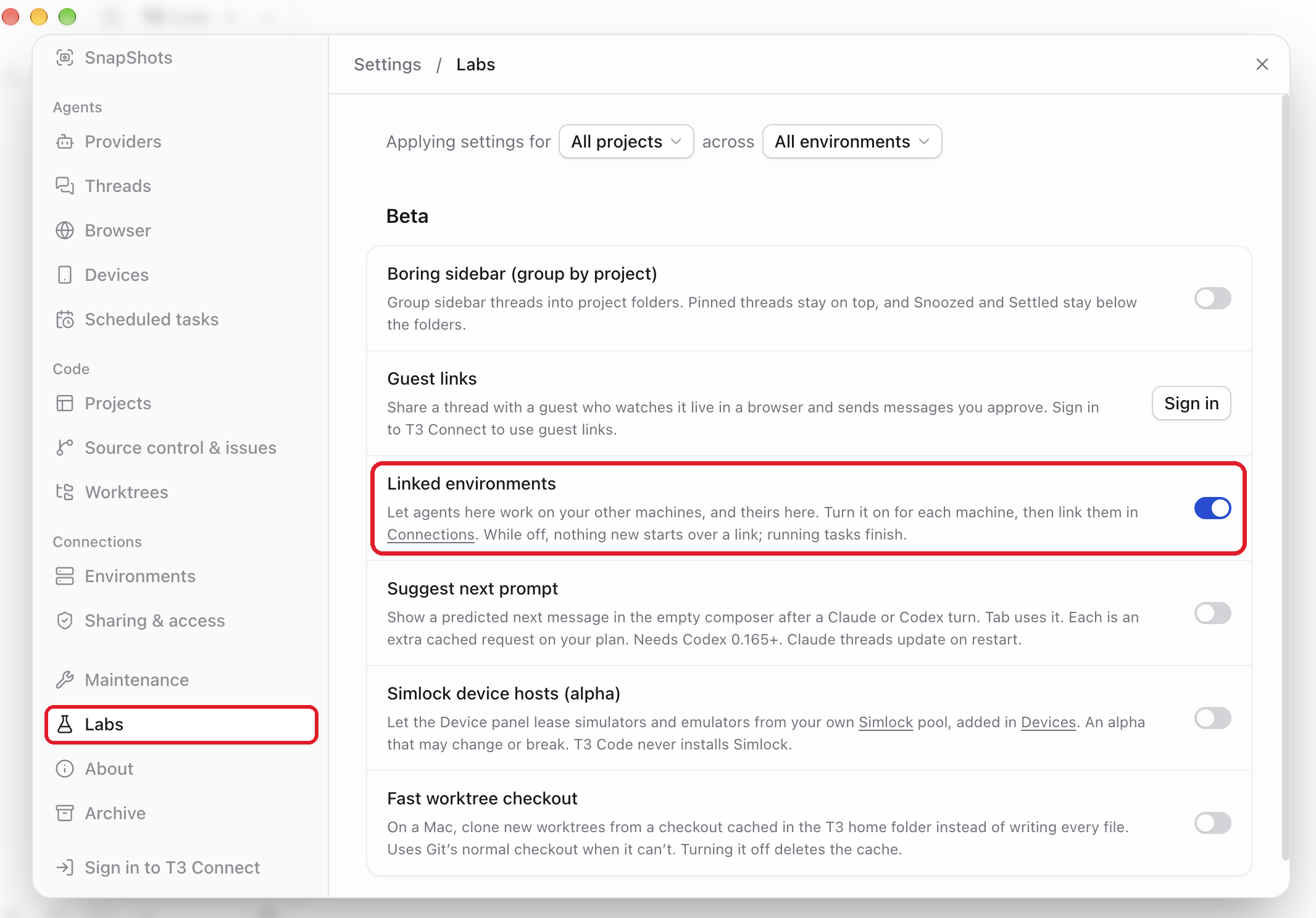
- turns on Linked environments in T3 Code (below);
- if the checkout's
originis on GitHub, lets t3exe's VMs clone and push it through an exe.dev GitHub integration, so private repositories work and no token is stored on a VM.
It's safe to run again. npx -y @exedev/t3exe logout undoes it: it removes
the MCP entries and integrations it added and revokes the key. It leaves
Linked environments on, and refuses while t3exe VMs exist, since they'd
outlive the key that deletes them; --force goes ahead anyway.
Hand a task to a VM#
Start a new thread in a project whose code is pushed to a Git host (t3exe
clones the project's origin), and ask:
Start an exe VM and have it run the tests there. Tell me what fails.
The agent calls exe_vm_create, and in under a minute t3exe:
- creates a VM tagged
t3exeand makes its port 8000 public; - installs your T3 Code version there, with Claude Code and Codex connected to exe.dev's LLM integration;
- clones your repository (the current branch's commits must be pushed; the
agent can pass a branch as
ref) and adds it as a T3 Code project; - links the VM to your T3 Code with a one-time pairing code.
The agent then calls delegate_task with the VM's environmentId and
projectId. The task runs on the VM as a thread marked From your
machine; open it from your thread to follow it read-only, or find the VM
under Settings → Environments. When it ends, your thread wakes with the
result. Several tasks can share one VM, and a thread can start several VMs
to run tasks side by side.
When the work is done the agent can call exe_vm_destroy. If it doesn't,
t3exe deletes a VM once no thread there has been busy for 15 minutes, and
every VM after 8 hours. It checks while an agent session that uses it is
open. Ask the agent to pause a VM instead, or to keep one longer.
Note
delegate_taskto a linked environment doesn't supportisolation: "worktree". Each VM has its own clone, so tasks there don't touch your checkout.
What the agent can ask for#
| Tool | |
|---|---|
exe_vm_create |
Create and link a VM. Takes repo ("none" for an empty one), ref, name, cpu, memory, access, and when to clean it up. |
exe_vm_list |
The VMs t3exe manages, their link status, and when each is paused or deleted. |
exe_vm_destroy |
Unlink and delete a VM. |
exe_vm_pause, exe_vm_resume |
Pause a VM (no CPU or memory in use, disk kept) and bring it back. |
exe_vm_configure |
Change when a VM is paused or deleted, or keep it. |
You can ask in plain words: "start a VM with 8 CPUs and 16GB", "pause it while I review this and resume it after", "keep that VM until I say so".
Private repositories#
If GitHub isn't connected to your exe.dev account, login says so. Connect
it on the Integrations page, then run
this in the checkout, or with OWNER/REPO, for each repository t3exe's VMs
should reach:
npx -y @exedev/t3exe repo add
Until then VMs clone a public repository from GitHub and can't push.
T3 Code on an exe.dev VM#
If your T3 Code runs on an exe.dev VM, set up as in
Run T3 Code on a remote server, t3exe runs there too,
next to its T3 Code. The VM has no Node.js, so on the VM install one in
~/node:
test -x ~/node/bin/node || uvx nodeenv -n lts ~/node
The VM can't run ssh exe.dev, so make the key on your computer and pipe
it into login on the VM, in your project's checkout there:
ssh exe.dev "ssh-key generate-api-key --label=t3exe-my-t3code --tag=t3exe --cmds='whoami,ls,new,rm,pause,resume,ssh,share port,share set-public' --exp=90d --json" \
  | ssh my-t3code.exe.xyz 'cd ~/myrepo && PATH=$HOME/node/bin:$PATH npx -y @exedev/t3exe login --token-stdin'
For a private repository, run npx -y @exedev/t3exe repo add you/myrepo on
your computer. Then hand a task to a VM from your
phone or browser as before.
Security#
- Each VM's T3 Code is public at
https://<vm>.exe.xyz/, because a T3 Code link can't sign in to exe.dev's proxy. T3 Code's own authentication guards it: t3exe links with a pairing code that works once, expires in five minutes, and carries only the scopes the link needs. - The link's
access(defaultfull-access) is the most your agents may do on the VM. The VM is a throwaway machine: your local files aren't on it. - Output that comes back from a VM was produced by code running there. t3exe tells agents to check it before following any instructions in it.
npx -y @exedev/t3exe logoutrevokes the API key and removes whatloginadded.
Update#
npx checks npm for a newer t3exe each time an agent session starts it, so
a new thread gets the latest release. npx -y @exedev/t3exe --help prints
the version on its first line.
Each VM runs the T3 Code version yours had when the VM was created, and a
link needs both ends on the same version. After t3 update, delete the
VMs you made before it (npx -y @exedev/t3exe rm NAME); new ones get
the new version.
Troubleshooting#
- The agent has no
exe_vm_createtool. Runclaude mcp listorcodex mcp liston the machine with your T3 Code and check thatt3exeis there and connected, then start a new thread. Runningloginagain re-adds it. no exe.dev API token. Runnpx -y @exedev/t3exe login, or, on a VM, pipe a key intologin --token-stdinas above. An expired key fails the same way.T3 Code CLI not found. The MCP server can't findt3. Runloginagain wheret3is on yourPATH; it saves the full path in the MCP entry.git clone failed. The repository is private; see Private repositories. Or the branch isn't pushed: push it and pass it asref.- Setup fails after the VM is created. t3exe deletes the VM and returns
the last lines of the setup log. Run
npx -y @exedev/t3exe createin the project's directory to watch each step. On a VM that did start,ssh <vm>.exe.xyz journalctl -u t3exeshows its T3 Code's log. - The VM shows as unreachable. It may be paused: ask the agent to
resume it, or run
npx -y @exedev/t3exe resume NAME. - Unexpected VMs in
ssh exe.dev ls. Every VM t3exe makes is taggedt3exe.npx -y @exedev/t3exe lsshows which it still manages; delete the rest withssh exe.dev rm NAME.
For how linked environments work, see T3 Code's remote access docs.
Frequently asked questions#
Is this the same as running T3 Code on exe.dev?
No. Run T3 Code on a remote server puts your one T3 Code on an always-on VM that you reach from your phone. t3exe keeps your T3 Code where it is, on your laptop or on that VM, and gives it more machines on demand: a new VM per task or batch of tasks, deleted when the work is done. They work together.
How much does it cost?
t3exe is free and MIT-licensed. Its VMs share your plan's CPU and memory and count toward its VM limit while they exist; a paused VM uses no CPU or memory. Agents on the VMs use exe.dev's LLM integration, billed to your account. See pricing.
Can t3exe touch my other VMs?
No. t3exe login makes an API key with --tag=t3exe: it creates VMs with that tag, and every other VM is "not found" to it. It may run only the commands t3exe needs, and it expires in 90 days.
Do I need T3 Connect or the T3 Code phone app?
No. Each VM serves T3 Code at its own https://<vm>.exe.xyz/ address, and your T3 Code links to it directly with a one-time pairing code.
Can the VMs use my Claude or ChatGPT subscription?
By default they use exe.dev's LLM integration, so no key or login is stored on them. To use your own, name the variables in T3EXE_FORWARD_ENV, such as ANTHROPIC_API_KEY, OPENAI_API_KEY, or CLAUDE_CODE_OAUTH_TOKEN from claude setup-token, and set them in the MCP server's environment. t3exe copies them to a 0600 file that only the VM's T3 Code service reads.
Why not just use subagents or worktrees?
For small tasks, do: they're faster. A VM is for work that needs a clean machine of its own, such as running a test suite, installing system packages, using Docker, or running several heavy tasks at once without slowing your laptop. Each VM is a whole Ubuntu machine with sudo.
Published Nov 21, 2026 · Updated Nov 21, 2026 · tested end to end Nov 21, 2026 · Markdown · manifest.json · Something wrong? Tell us